

Introduction
Digital payments have become an everyday part of modern life. Whether you swipe a debit card at a store, tap your phone at a café, or click “Pay Now” on an e-commerce website, the transaction feels almost instant.
But behind that single tap or click, a complex financial and technological process takes place. Multiple systems, institutions, and security checks work together in real time to ensure that money moves safely from the customer to the merchant.
This article explains how digital payments work, step by step — from the moment a card is swiped or payment is initiated, all the way to final settlement in the merchant’s bank account.
What Are Digital Payments?
Digital payments are transactions completed electronically without using physical cash. Instead of exchanging banknotes or coins, money is transferred digitally between accounts using secure systems.
Common forms of digital payments include:
- Debit and credit card payments
- Mobile wallets
- Online banking transfers
- QR code–based payments
- Subscription and recurring payments
At their core, all digital payments follow a similar flow, even though the front-end experience may differ.
Key Participants in a Digital Payment
Before diving into the process, it’s important to understand the main entities involved in a digital payment.
1. Customer
The individual or business initiating the payment using a card, wallet, or banking app.
2. Merchant
The business or service provider receiving the payment for goods or services.
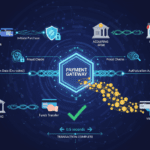
3. Payment Gateway
A technology layer that securely captures and transmits payment information from the customer to the payment processor.
4. Payment Processor
The system responsible for communicating with banks and card networks to process the transaction.
5. Issuing Bank
The customer’s bank — the bank that issued the debit or credit card.
6. Acquiring Bank
The merchant’s bank — the bank that receives funds on behalf of the merchant.
7. Card Networks
Global networks such as Visa, Mastercard, or others that route payment messages between banks.
Each of these players performs a specific role to ensure payments are processed correctly and securely.
Step 1: Payment Initiation
The digital payment process begins when the customer initiates a transaction.
Examples:
- Swiping or tapping a card at a POS terminal
- Entering card details on a checkout page
- Selecting a saved payment method in a mobile app
At this stage, basic transaction details are captured:
- Payment amount
- Card or account information
- Merchant details
- Location and device information
This data is immediately prepared for secure transmission.
Step 2: Data Encryption and Security
Before any payment data leaves the merchant’s system, it is encrypted.
Encryption ensures that sensitive information such as:
- Card number
- CVV
- Expiry date
is converted into unreadable code during transmission. This prevents unauthorized parties from accessing or misusing the data.
Many systems also use tokenization, where actual card details are replaced with a random token. Even if intercepted, the token cannot be reused.
Security at this stage is critical to protect customers from fraud and data breaches.
Step 3: Payment Gateway Transmission
Once encrypted, the payment details are sent to the payment gateway.
The payment gateway acts as a secure bridge between:
- The merchant’s website or POS system
- The payment processor and banks
Its responsibilities include:
- Validating payment data format
- Applying basic fraud checks
- Forwarding data to the processor securely
Without a payment gateway, online and digital payments would not be possible at scale.
Step 4: Authorization Request
The payment processor forwards the transaction request through the card network to the issuing bank.
At this stage, the issuing bank performs several checks:
- Is the card valid?
- Is the card active?
- Are sufficient funds or credit available?
- Does the transaction appear suspicious?
This process is known as authorization.
Step 5: Authentication (When Required)
For many digital payments, especially online transactions, additional authentication is required.
This may include:
- One-time passwords (OTP)
- PIN verification
- Biometric confirmation
- Two-factor authentication
Authentication adds an extra layer of protection and helps prevent unauthorized transactions.
If authentication fails, the transaction is declined immediately.
Step 6: Authorization Response
After completing its checks, the issuing bank sends a response back through the card network and processor.
The response is either:
- Approved – Funds are temporarily reserved
- Declined – Transaction is rejected
If approved, the customer sees a confirmation message, and the merchant is notified that the payment is successful.
At this point, no money has moved yet. The funds are only reserved.
Step 7: Completion of Customer Transaction
From the customer’s perspective, the payment is complete. They receive:
- A receipt
- A confirmation screen or message
However, behind the scenes, the transaction is still in a pending state until settlement occurs.
Step 8: Clearing and Settlement
Settlement is the process where actual funds are transferred from the issuing bank to the acquiring bank.
Clearing
Clearing involves reconciling transaction details between banks and card networks. This usually happens in batches at the end of the business day.
Settlement
Settlement occurs when funds are moved from the issuing bank to the acquiring bank and then credited to the merchant’s account.
This process typically takes:
- 1–3 business days for card payments
- Sometimes longer for cross-border transactions
Authorization vs Settlement: Key Difference
Many people assume money moves instantly, but that’s not always true.
- Authorization: Confirms that funds are available and reserves them
- Settlement: Transfers the actual money
This separation helps manage risk and enables dispute handling.
Step 9: Merchant Payout
Once settlement is complete, the acquiring bank credits the merchant’s account.
Depending on agreements, merchants may receive payouts:
- Daily
- Weekly
- On a fixed schedule
Fees such as processing charges are usually deducted before payout.
Why Digital Payments Sometimes Fail
Not all digital payments succeed. Common reasons include:
- Insufficient funds
- Network connectivity issues
- Incorrect card details
- Security or fraud flags
- Expired cards
Most failures are detected early to prevent incorrect charges.
Security Measures Throughout the Process
Digital payments rely on multiple layers of security:
- End-to-end encryption
- Tokenization
- Real-time fraud monitoring
- Compliance with security standards
- Secure authentication methods
These layers work together to reduce risk and maintain trust.
Role of Compliance and Standards
Digital payment systems must follow strict regulations and standards, such as:
- Payment security requirements
- Data protection rules
- Operational guidelines set by card networks
Compliance ensures consistent security across the global payment ecosystem.
Why Understanding Digital Payments Matters
Understanding how digital payments work helps:
- Businesses optimize checkout experiences
- Developers design secure systems
- Customers trust digital payment methods
- Regulators ensure safe financial operations
Digital payments are no longer optional — they are a foundation of modern commerce.
Conclusion
A single digital payment may feel instant, but it involves a carefully coordinated sequence of technology, banks, networks, and security checks.
From the initial card swipe or click to final settlement in the merchant’s account, every step is designed to ensure speed, accuracy, and security.
As digital commerce continues to grow, understanding this process becomes essential for anyone involved in finance, technology, or online business.